![Relevant_yield_logo.png]](https://help.relevant-digital.com/hs-fs/hubfs/Logos/Relevant_yield_logo.png?height=50&name=Relevant_yield_logo.png)
In Yield, you essentially have two options for exporting your publisher and website structure: either to check for placement ID duplicates or to export the structure as it is. The CSV files are quite similar but contain slightly different columns.
Exporting Your Data
To export your current structure to a CSV file, simply go to Publisher Accounts and locate the Export as CSV and Export duplicates as CSV buttons in the top menu:
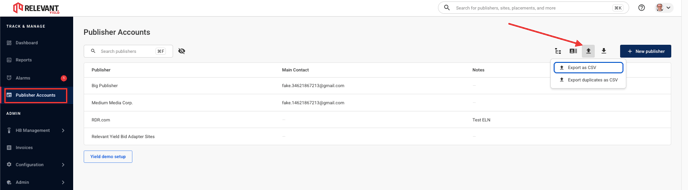
Export as CSV
Export as CSV contains your structure as it is in Yield. The file contains the following columns:
-
Publisher name
-
Site
-
Placement name
- Placement type
- Adserver
- Adserver placement
- SSPs with their placement IDs
Export duplicates as CSV
Export duplicates as CSV file highlights the duplicate placement IDs in your Yield structure. The file contains the following columns:
- Publisher
- Site
- Placement
- SSP
- SSP Placement ID
- SSP Placement Name
- Has duplicates: with values Yes or empty