
Welcome to the Relevant Yield Feature and Information Letter!
Welcome, dear user of Relevant Yield, to the fourth release of 2025. This release includes many new features and as always several tweaks and updates to existing functionality.
Lets jump straight into it!
Here is a list of the new features and updates added:
- Improved Target Advertiser handling
- Ability to see saved reports in List or Tile mode
- Filter for Unique lines in reports
- Alarm notifications via Slack
- User specific preferences for date formatting and thousand separator style
- Improved DPO/SPO automation
- Support for political ads
- Prebid Server version transparency
- Additional SSP API sources and improvements to existing sources
- SSO options for login
- Improved advertiser data from GAM
- AI-based quick help Icons
- LivePreview functionality
The release will drop this and next week.
Modules: .png?upscale=true&width=145&name=label_ARI%20(1).png)
.png?upscale=true&width=100&name=label_HBM%20(1).png)
.png?upscale=true&width=102&name=label_HBA%20(1).png)
1. Improved Target Advertiser handling
The new improvements mean that you can now edit the name of a Target Advertiser and assign it to a single defined Primary Buyer.
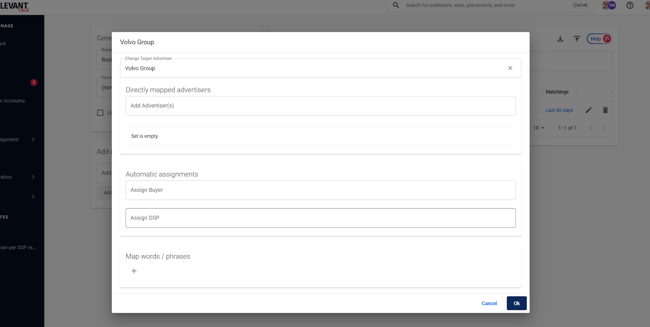
We have also introduced new logic to manage the relationship between manually added Advertisers and those added through automated semantic matching. From now on, manually added Advertisers will take precedence over automatically added ones, giving you greater control over your Target Advertisers.
What's in it for you?
Renaming a Target Advertiser makes it easier to keep your Target Advertiser list accurate and up to date.
The Primary Buyer assignment helps bridge the gap between the technical reality (what is recorded in the systems) and the sales reality. An Advertiser might be managed by a single Buyer who uses multiple subsidiaries with their own seats, causing the fractions you would see in the technical data. This feature aligns the presentation of Advertisers with Buyers more closely to the day-to-day market reality your sales team works in.
The addition of logic to prioritise manually added Advertisers over the automated semantic classification gives you better control over which Target Advertiser and Advertiser belong together, giving you, as a Publisher, the final decision-making authority.
Modules: 
2. Ability to See Saved Reports in List or Tile Mode
You can now select the mode that suits you best, depending on your personal preference.
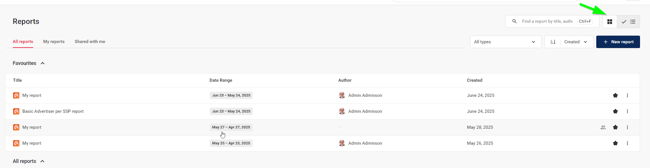
What's in it for you?
Handling is now easier for users with many saved reports, as the tile view can sometimes feel overwhelming.
Modules: 

3. Filter for Unique Lines in Reports
We have added a filtering option to remove duplicates when using more than one dimension in a list. This makes it easier to identify unique items or lines.
The dropdown appears when more than one dimension is selected and provides options for what to filter:

A good example of this is when you want to see which Advertiser is buying through which SSP and remove those buying through multiple SSPs. Using the filter will remove all duplicates, leaving only the Advertisers that are unique across all SSPs in your dataset.
What's in it for you?
This provides an easy way to filter all your unique lines, which can be useful for many purposes, but is particularly helpful for identifying unique demand relationships in your current dataset.
Modules:
4. Alarm Notifications via Slack
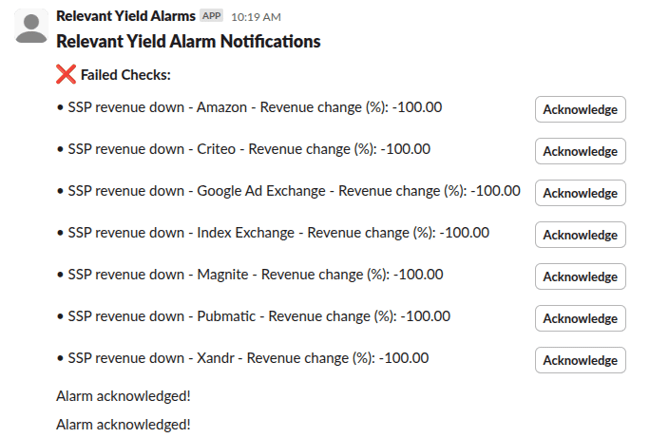
You can now select to have your alarms show up in Slack.
It is easy to enable this option from the Alarms section if you want to use this notification method:
What's in it for you?
This provides an easy way to send alarms to a Slack channel that you may be sharing with your co-workers.
You can, of course, still send email notifications, but Slack may be the preferred option in your company for this type of communication - we use it ourselves!
Modules:
5. Date Formatting and Thousand Separator Style
We have now made it possible for users to set a few preferences regarding how they would like data to be displayed in the system. These settings do not affect other users, so publishers operating across different countries can ensure that each user sees the system in their preferred format.
We have added support for:
- Date formatting
- Thousand separator
You can set your preferences though your user settings: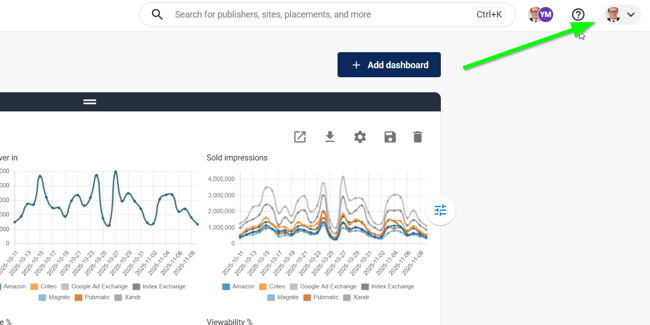
What's in it for you?
Increased flexibility and greater comfort in working in the format that you prefer.
Modules:
6. Improved DPO/SPO Automation
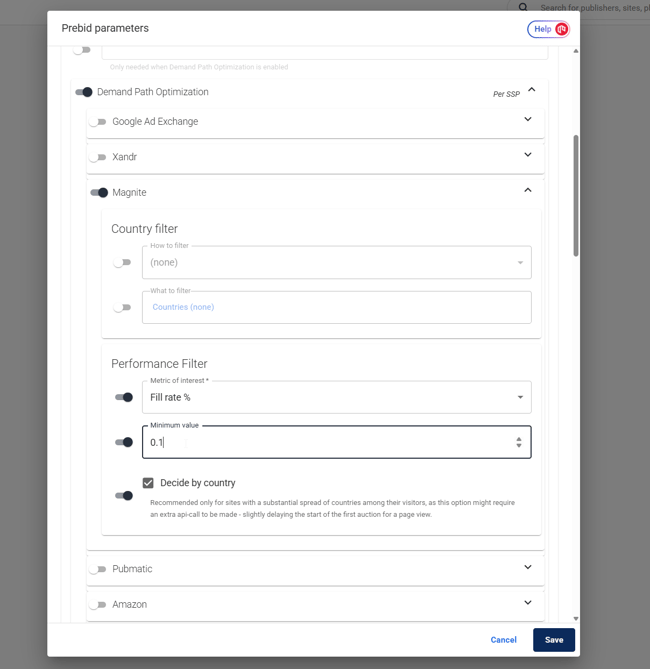
We have now added the ability to set up criteria that will automatically adjust the settings in the traffic shaping section of the HB Manager.
You can choose to trigger this functionality for each SSP, based on Fill Rate and Ad Unit eCPM, and it can also be configured to check per country if preferred:
What is in it for you?
You can now automate the process of not sending requests to SSPs in areas with a very low likelihood of generating any sales. This reduces unnecessary traffic and has a positive environmental impact.
By filtering out unwanted traffic early in the flow, some SSPs may reward you with a higher quality rating. However, please note that this can potentially lead to lower revenues. It is recommended to start with a low Fill Rate threshold and carefully monitor the effects, whether positive or negative.
Modules:
7. Support for Political Ads
New legislation means that most Ad Servers and SSPs now block political advertising in both programmatic and direct environments. However, a few SSPs allow it through additional administrative handling, making it possible for publishers to serve such campaigns.
We now support these SSPs by rendering the ad before it reaches the Ad Server. Essentially, the Ad Server is bypassed, and the ad is rendered directly if one of the SSPs signals that it is a political campaign. We still measure the campaign’s value alongside other demand sources in the auction, ensuring it provides value to you as a publisher.
You can read more about setting up direct rendering here.
You may also want to refer to the AdsCallbacks help section.
Finally, if you want to see how this works in practice, it is a good idea to use our new LivePreview functionality, which is also featured in this newsletter. It makes testing much easier.
If you need help setting this up, or if you have an SSP that is not yet supported for political ads, please contact the Customer Success team. We will check whether we can add that particular source.
What's in it for you?
This feature allows you to run political ads through selected SSPs, enabling you to capture some political demand through your systems.
Please note: You will most likely need to address additional consent requirements to ensure the handling is legal. It is advisable to check with your legal team and your Consent Management Platform to be certain.
Modules:
8. Prebid Server Version Transparency
You can now view the Prebid Server version running on your system. You can also ask Relevant AI about this version, as it synchronises with the Prebid repositories on a daily basis:
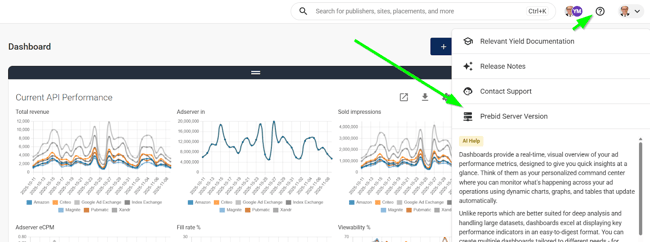
With this information, you can check whether specific Bidders are supported in that version, as well as review which Bidders have general Prebid Server support or ask other Prebid-related questions.
What's in it for you?
Easier access to Prebid server versioning information and better system transparency.
Modules:
9. Additional SSP API Sources and Improvements on Existing Sources
We have added support or improved API connections for:
- Voltax (Minute Media)
- Adagio
- Criteo
What's in it for you?
More options to get your API data in, and more SSPs supported when experimenting.
Modules:
10. SSO Options for Login
We can now disable password-based login, requiring users to sign in via their Google account or other supported providers.
If you are interested in this option, we recommend contacting your Customer Success Manager, who will assist you with the setup.
What's in it for you?
A safer and better way for you to control access to the Relevant Yield system.
Modules:
11. Improved Advertiser Data from GAM
Sometimes the Advertiser data from GAM is incomplete. We now also check a secondary data table in GAM, the Advertiser domain, and if the Advertiser name is not available, we populate the “Advertiser” field with data from the Advertiser domain.
What's in it for you?
A more complete data set of Advertisers from your GAM account.
Modules:
12. AI-based Quick Help Icons
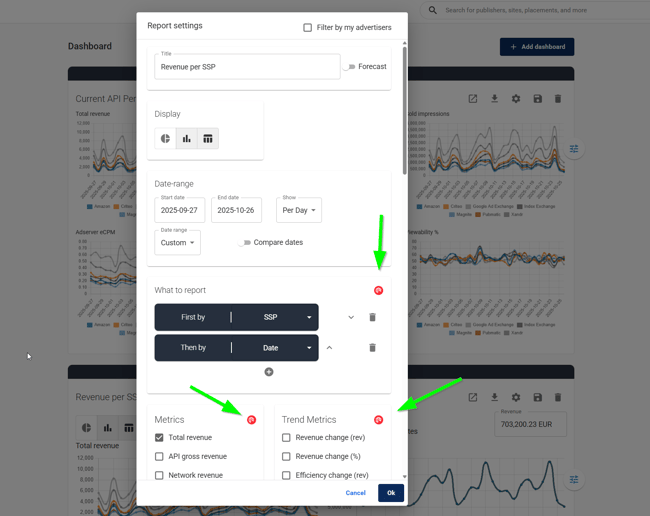
We have added help icons to several places in the tool, making it easier to get quick AI-based feedback on specific functions in the tool.
What's in it for you?
An easy way to get information catered to a specific function, without having to prompt the Relevant AI yourself.
Modules:
13. LivePreview Functionality
We have now added the ability to perform a simple LivePreview by using a link in Relevant Yield to see how your settings would appear in the LivePreview window.
The LivePreview option is available on pages where you would normally make changes to the Prebid parameters, including Global, Publisher, Website, and Placement levels.
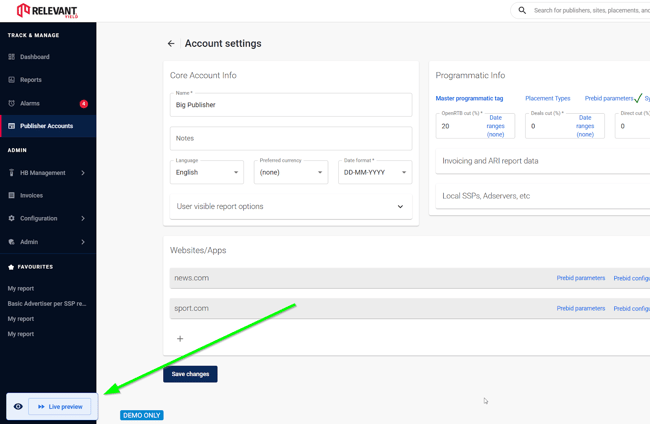
The LivePreview offers several options. You can use a demo bidder with selected base CPMs that does not log data in HB Analytics, allowing you to test bids without recording them:
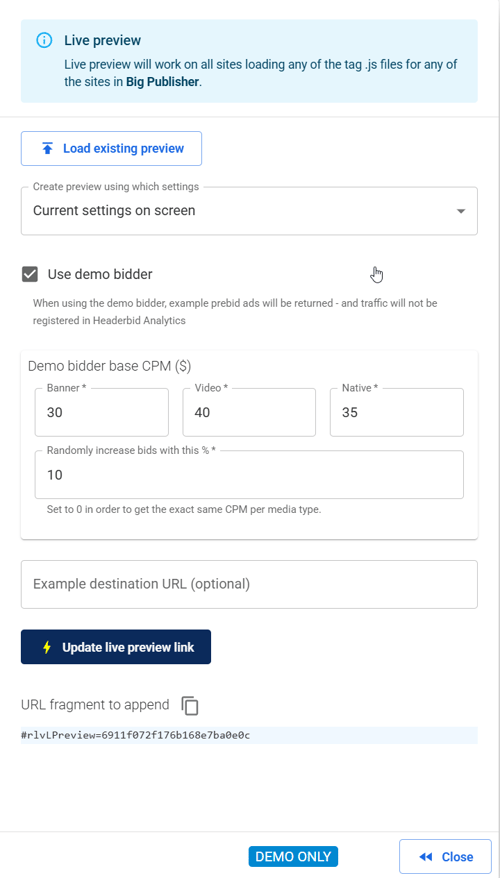
You can then add the URL you want to test, and Relevant Yield will generate a test URL fragment to append to it. Please note that the test page URL must belong to the Publisher for which you are setting up the test.
What's in it for you?
An easy way to test out new functionality, without having to create test configurations in most cases. It also makes it possible to test new Prebid versions easily which is very useful!
Modules: